
Transmission #011: Lux, Mana, and the Combat Overhaul
Biggest single-day change so far. With icons auto-generating (Transmission #010), we went after the core gameplay loop: mana, Lux as a world entity, harvestable trees, scrolls, mobile combat controls, and a bunch of animation/hit-detection fixes. Here’s everything.
Lux is in the world
LuxEntity is the new single component that replaces the old separate FlyingBeast and GPSFlyingController. Drop it on an empty GameObject and it handles everything: GPS tracking to follow the player’s real-world position, a point light and glowing orb visual created at runtime, and – most importantly – a mana well. When the player stands within manaWellRadius (default 8 units), mana regenerates at a rate scaled by Lux’s growth level. You can call Feed() on Lux to increase his growth and boost regen for everyone in range. Finding Lux is now the first real objective.
LuxCompassHUD sits on the screen edge closest to Lux and shows distance in meters. It handles portrait and landscape, flips when Lux is behind the camera, and uses edge-intersection math to stay pinned to the nearest screen border.
Mana system
CharacterStats now tracks current/max mana alongside health. There’s a TrySpendMana() method for abilities, an OnManaChanged event, and consumable effects work for "Mana" the same way they do for "Health". A new PlayerManaBarUI component builds a mana bar under the health bar at runtime – same reference resolution, same pattern.
Harvestable trees
Every tree spawned by OSM3DBuilder can now be harvestable. The harvestableTreeFraction (defaulted to 1.0 – all trees) controls what fraction gets a HarvestableTree component attached. Harvestable trees spawn 25% larger so you can tell them apart. When you melee a harvestable tree and its health hits zero, it drops items (e.g. Firewood) and an optional stump replaces it. There’s also a chance to drop a scroll.
Scrolls for moves
ScrollItemDefinition is a new item type: a scroll that teaches an ability. Use it from the inventory and the ability gets equipped to the first empty ability slot (Ability0/1/2). The scroll is consumed. This is how you learn new spells – find scrolls in the world (from tree drops or future sources), then use them.
Combat overhaul
Bone-based melee. PlayerCombat now caches the humanoid rig’s hand and foot bones via Animator.GetBoneTransform(). Based on the ActionId – jab, cross, hook, kick, sword swing – the melee overlap sphere centers on the actual bone position instead of a fixed offset from transform.forward. Hooks use the left hand, kicks use the right foot, everything else defaults to the right hand. Falls back to the old direction-based sphere if no bone is found.
Damage multipliers. PlayerMovesetDriver.GetDamageMultiplier() returns a multiplier for every ActionId: 1x for taps (jabs, pokes), 1.5x for holds (kicks, heavy slashes), 1.75x for airborne heavy slashes, 2x for throws. Non-damaging actions (dodge, block, interact, jump) return 0 so no melee check fires.
Attack direction from stick. On mobile, the melee hit direction now follows the stick you tilted rather than transform.forward. PlayerCombat.SetAttackDirection() accepts a world-space vector that overrides the next melee check, then clears itself.
PvP and faction. GameRules.IsDamageAllowed() checks whether both attacker and target are players; if so, damage is only allowed when pvpEnabled is true (default false). PlayerFaction is a simple component with a faction ID for future land-control and honor rules.
Combat toggle. PlayerCombat.combatEnabled lets you turn off all combat input and damage for peaceful mode.
Controls overhaul
Action joysticks. The seven action buttons (Def, Abil, Fist, Use, Sword, Bow, Jump) are now small joysticks instead of buttons. Tilt one past the threshold to trigger the action. Each stick has a label so you know what it does. The action stick’s tilt direction is passed through as PendingActionDirection so directional variants fire correctly (e.g. tilting the Sword stick right triggers “Armed - Tap R”).
Snappy combat mode (optional, off by default). When enabled, the right stick fires light attacks and a third joystick above the move stick fires heavies. Eight directions map to action IDs. Disabled by default because the action-joystick layout already covers all moves.
Stick combos. StickComboInput + StickComboPreferences let you map two-stick combos (both sticks left, both sticks up, etc.) to any action. Create a preferences asset, assign it, and tilting both sticks in the mapped directions fires the action.
Jump and movement fixes
Variable jump height. Releasing the jump input early multiplies upward velocity by jumpCutMultiplier (default 0.5), giving you short hops and full jumps from the same button. Coyote time (0.12s) lets you jump briefly after walking off a ledge.
Directional jumps. Tilting the Jump stick forward/back/left/right now triggers ActionIds 103-106, matching the animator’s directional jump states. Previously only neutral jump (60) worked.
Jump-on-press. Jump animation now fires on the press frame, not release. This fixes the bug where the physics jump launched the character into the air before the animation started, causing ground-only jump anims to be skipped.
Animation ID fixes
Several ActionId-to-animator mismatches were fixed: unarmed tap L/R were swapped (code had L=13, R=14; animator expected the opposite), armed tap forward generated ID 21 which had no animator transition (mapped to 22), and ranged tap/hold offsets were off-by-one. Interact hold directions were hardcoded to match the animator: N=51 Mine, F=53 Hoe, B=54 Gather, L=55 Build.
Other changes
- Chunk edge borders –
DEMTerrainBuildercan now paint a colored gradient at chunk edges so you can see where one chunk ends and the next begins. - Melee sphere tuning –
meleeRadiuswidened from 1.25 to 2.5,meleeRangeshortened from 2 to 1.5 (bigger sphere, closer to the player, much more forgiving on mobile). - Pickup radius –
WorldPickup.pickupRadiusincreased from 1.5 to 3 for easier collection on mobile. - Floating damage on trees –
FloatingDamageNumberUInow listens toHarvestableTree.OnHarvestableDamagedand shows yellow numbers when you hit a tree. - Terrain height fix –
OSM3DBuilder.SampleHeightAtLocalnow adds_terrain.transform.position.yso buildings and trees sit at the correct world height instead of floating.
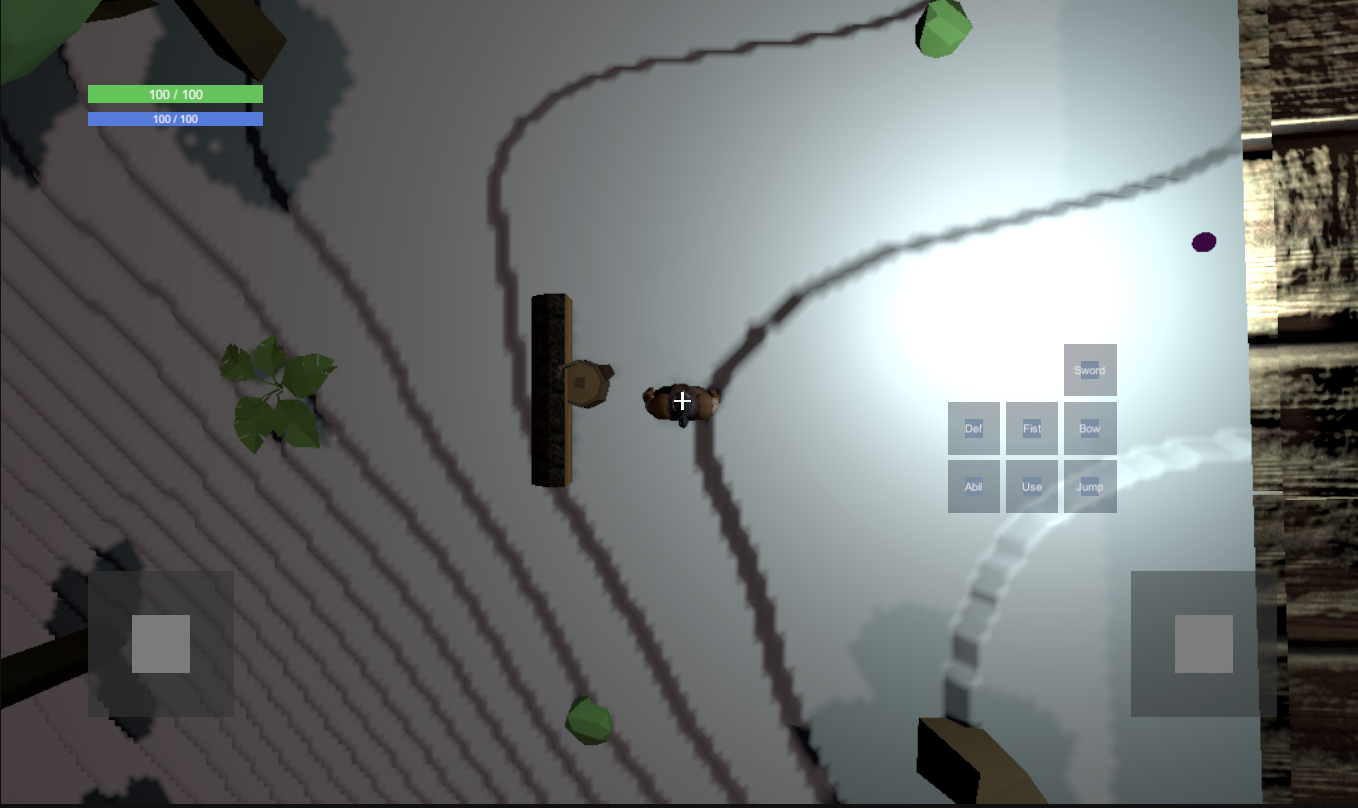
It’s the most the game has ever felt like a game. Walk around the real-world map, find Lux for mana, chop trees for wood and scrolls, learn new abilities, fight things. The loop is there.